
Automated Blog/Book Audio Converter using AWS Polly and Lambda
Objective
Develop an automated system that converts text content stored in Amazon S3 into high-quality audio using Amazon Polly. Enhance content accessibility, user engagement, and broaden your audience reach.
Scope and Use Cases
- Accessibility: Provide audio versions for visually impaired or differently-abled users.
- Education: Enable learners to listen to educational materials anytime.
- Content Distribution: Expand reach of blogs, newsletters, and books via audio.
- User Convenience: Cater to multitaskers who prefer audio while commuting or exercising.
System Architecture
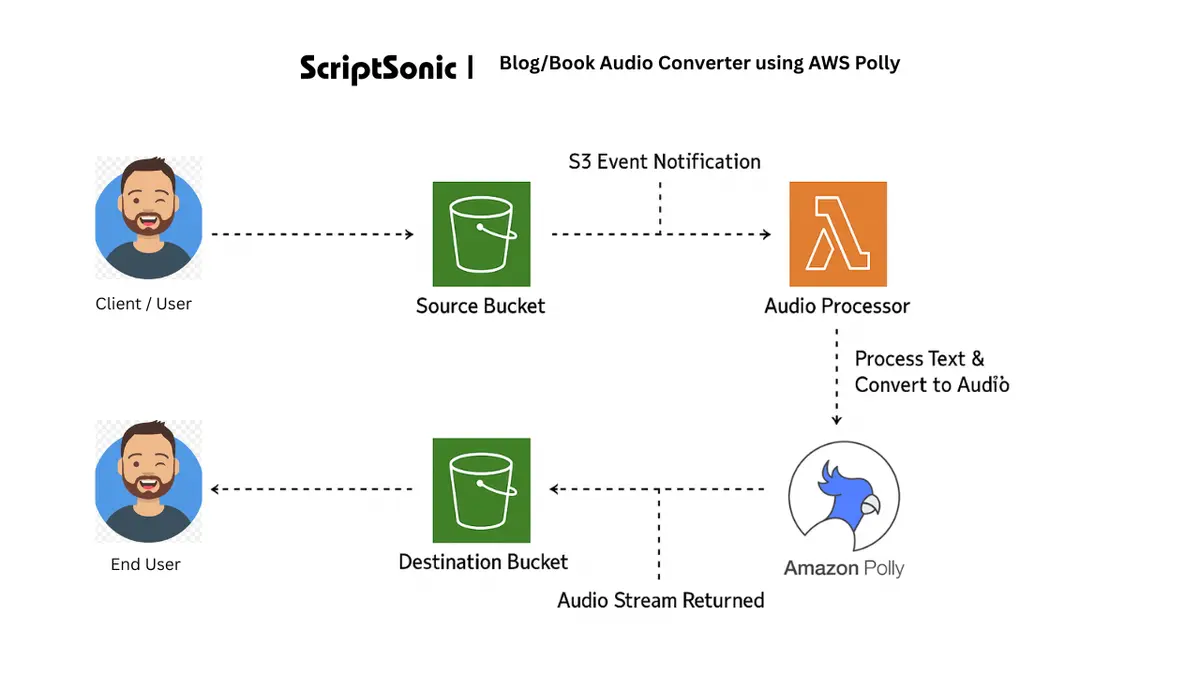
1️⃣ Amazon S3 (Source Bucket): Stores uploaded .txt files.
2️⃣ Amazon S3 (Destination Bucket): Stores generated .mp3 audio files.
3️⃣ AWS Lambda: Triggered by S3 events to process text and call Amazon Polly.
4️⃣ Amazon Polly: Converts text to lifelike speech.
5️⃣ IAM Roles and Policies: Ensure secure permissions for Lambda to access S3 and Polly.
Step-by-Step Implementation
AWS Account Setup
- Create a free/paid AWS account.
- Configure AWS CLI or console access for deployment.
Create Two S3 Buckets
- Source Bucket:
pixel-source-bucket(for.txtuploads) - Destination Bucket:
pixel-destination-bucket(for.mp3output)
Create IAM Policy
jsonCopyEdit{
  "Version": "2012-10-17",
  "Statement": [
    {
      "Effect": "Allow",
      "Action": [
        "s3:GetObject",
        "s3:PutObject"
      ],
      "Resource": [
        "arn:aws:s3:::pixel-source-bucket/*",
        "arn:aws:s3:::pixel-destination-bucket/*"
      ]
    },
    {
      "Effect": "Allow",
      "Action": [
        "polly:SynthesizeSpeech"
      ],
      "Resource": "*"
    }
  ]
}
Name it amc-polly-lambda-policy.
Create IAM Role
- Role Name:
amc-polly-lambda-role - Attach Policies:
amc-polly-lambda-policyAWSLambdaBasicExecutionRole
Create AWS Lambda Function
- Function Name:
TextToSpeechFunction - Runtime: Python 3.8 (or higher)
- Environment Variables:
SOURCE_BUCKET = pixel-source-bucketDESTINATION_BUCKET = pixel-destination-bucket
Configure S3 Event Trigger
- Event Type: Object Created (PUT)
- File Filter:
.txt - Trigger Target:
TextToSpeechFunction
Lambda Function Code (Optimized for SEO)
pythonCopyEditimport boto3
import os
import logging
import json

logger = logging.getLogger()
logger.setLevel(logging.INFO)

def lambda_handler(event, context):
    s3 = boto3.client('s3')
    polly = boto3.client('polly')
    source_bucket = os.environ['SOURCE_BUCKET']
    destination_bucket = os.environ['DESTINATION_BUCKET']

    text_file_key = event['Records'][0]['s3']['object']['key']
    audio_key = text_file_key.replace('.txt', '.mp3')

    try:
        logger.info(f"Fetching text file: {text_file_key}")
        text_file = s3.get_object(Bucket=source_bucket, Key=text_file_key)
        text = text_file['Body'].read().decode('utf-8')

        response = polly.synthesize_speech(
            Text=text,
            OutputFormat='mp3',
            VoiceId='Joanna'
        )

        if 'AudioStream' in response:
            temp_audio = '/tmp/audio.mp3'
            with open(temp_audio, 'wb') as file:
                file.write(response['AudioStream'].read())
            s3.upload_file(temp_audio, destination_bucket, audio_key)

        logger.info(f"Audio uploaded: {audio_key}")
        return {'statusCode': 200, 'body': json.dumps('Success')}

    except Exception as e:
        logger.error(f"Conversion failed: {e}")
        return {'statusCode': 500, 'body': json.dumps('Error')}
Testing
- Upload
.txtfile topixel-source-bucket. - Lambda triggers automatically.
- Polly converts text to
.mp3. - Audio available in
pixel-destination-bucket. - Download and test playback.
Expected Outcomes
- Fully automated text-to-speech conversion.
- Support for blogs, newsletters, and book excerpts.
- Instant audio availability for uploaded text.
- Improved accessibility and user engagement.
Future Enhancements
- Multi-language and voice support with Amazon Polly.
- API Gateway integration for on-demand conversions.
- Support for PDF/DOCX conversion to text.
- Web or mobile UI for uploads and playback.
SEO Keywords for Better Reach
- AWS Polly Text to Speech
- Convert Text to Audio AWS
- Blog to Audio Converter AWS
- Amazon Polly Lambda Integration
- AWS Serverless Text-to-Speech
- Accessibility Solutions with AWS
- Automated Audio Generation with AWS
Conclusion
The ScriptSonic AWS project demonstrates how to build an automated text-to-audio converter using Amazon S3, AWS Lambda, and Amazon Polly. It’s a scalable, accessible, and serverless solution, perfect for content creators, educators, and developers.
=